
Skip to content

Test version: the venues and Dungeon Masters are examples and nothing is charged yet.

DND México

DND México uses the 5.5e version of the Player’s HandbookThis is the 2024 edition. Pick those rules when you create your character.

Open D&D Beyond

Step-by-step tutorial

  1. Go to D&D Beyond

    Go to the official D&D Beyond site and sign up or sign in.

    Open D&D Beyond

  2. Sign in and create a character

    Go to the Characters section and choose the option to create a new character.

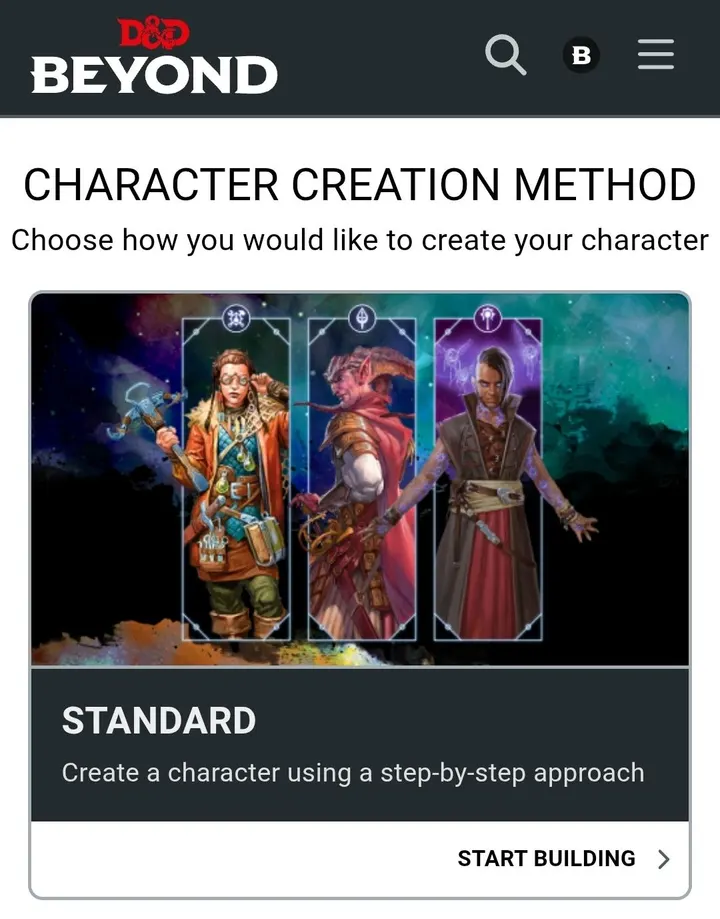
  3. Choose the creation method

    Choose the creation method available, according to the options the platform offers.

    D&D Beyond screen for choosing the character creation method, with the Standard Array option.
    Recommended: Standard Array (preset values)
  4. Choose a class

    Select the class your character will have, for example: Fighter, Wizard, Rogue, Cleric or Paladin.

  5. Choose a species and a background

    Select your character’s origin traits and their background, according to the options available.

  6. Assign ability scores

    Distribute your character’s ability scores following the Dungeon Master’s instructions or the event rules.

    See the ability scores tutorial

  7. Choose equipment and skills

    Select the weapons, armor, equipment, skills and spells that match your class.

  8. Customize your character

    Add a name, physical appearance, personality, backstory and other narrative details.

  9. Review the character sheet

    Check that the information is complete and that the level and rules match the event’s instructions.

  10. Save and open the sheet

    Save your character and open its sheet to check its stats and skills.

How to assign ability scores

Ability Scores determine your character’s main capabilities: Strength, Dexterity, Constitution, Intelligence, Wisdom and Charisma.

While creating your character in D&D Beyond you will find three methods to determine these scores: Standard Array (preset values), Point Buy and Manual/Rolled (dice rolls). Each one offers a different way to build your adventurer.

In the 2024 Player’s Handbook, ability score increases (+2 and +1, or +1 to three scores) come from the background, not from the species. D&D Beyond asks for them when you pick the background and adds them to the scores you assign here.

Standard Array (preset values)

This is the simplest method. You get six preset scores that you can distribute among your six abilities.

The available values are:

  • 15
  • 14
  • 13
  • 12
  • 10
  • 8

How to use it

  • Select Standard Array in the generation menu.
  • Assign each number to one of the six abilities.
  • Put the highest scores in the abilities that matter most for your class.
  • D&D Beyond will calculate the matching modifiers automatically.

Example: A Fighter could prioritize Strength and Constitution.

Manual / Rolled (dice rolls)

Based on luck.

4d6

How to use it

  • Select Manual/Rolled.
  • Roll four six-sided dice (4d6).
  • Drop the die with the lowest result.
  • Add the remaining three dice.
  • Repeat the procedure six times to get your six scores.
  • Enter the results manually in D&D Beyond and distribute them among your abilities.

Example: If you roll 6, 4, 3 and 2, you drop the 2 and add 6 + 4 + 3 = 13 points. Repeat until you have all six abilities.

Point Buy

This system lets you distribute your abilities freely using a budget of 27 points.

Each score has a different cost. The higher the ability, the more points you need to spend.

27

Point cost of each score in Point Buy
ScoreCost
80
91
102
113
124
135
147
159

How to use it

  • Select Point Buy.
  • Distribute the 27 points among your six abilities.
  • You can raise or lower the values as you need.
  • With this system you cannot have an ability below 8 or above 15.
  • D&D Beyond will show the remaining points automatically.

Example: A wizard could spend more points on Intelligence and Constitution, giving up some Strength or Charisma.

What do the numbers mean?

Each ability has a numeric score. However, what matters is not only the number, but the Ability Score Modifier you get from it.

This table shows how they relate:

Modifier that matches each ability score
ScoreModifier
1−5
2–3−4
4–5−3
6–7−2
8–9−1
10–11+0
12–13+1
14–15+2
16–17+3
18–19+4
20+5

Point Buy calculator

Try how to split the 27 points before you go into D&D Beyond.

AbilityScoreModifier
Strength
8
−1
Dexterity
8
−1
Constitution
8
−1
Intelligence
8
−1
Wisdom
8
−1
Charisma
8
−1

Points left:27 / 27

Link your character to DND México

You can link your D&D Beyond character to your DND México profile, so your Dungeon Master and the community reach your sheet in one tap.

  1. Open the sheet

    Open the character sheet in D&D Beyond.

  2. Copy the link

    Copy the link to the character sheet.

  3. Go to your profile

    Go to your personal DND México profile.

  4. Go to characters

    Go to the characters section and choose the option to add or edit one.

  5. Paste the link

    Paste the D&D Beyond link in the matching field.

  6. Save

    Save the changes.

Go to my profile

Check your link before pasting it

Paste the link to your sheet here and we will tell you if the format is valid. It is only an example: nothing is saved.

The format is https://www.dndbeyond.com/characters/ followed by your sheet number.

Paste a link to check it.

When you save, we check the format of the link. Set your sheet to public so your DM can open it.

Back to the GuideGo to my profile